Short answer:
To change bpm of a song without changing pitch, use time stretching, not a plain playback speed control. Time stretching changes how long the audio plays while every note stays in its original key. First tap the song’s original BPM on the Tap BPM tool at https://tappingbpm.com/, then divide the target BPM by the original BPM to get the speed factor, and enter that factor in a time stretch tool. A 120 BPM song moved to 90 BPM runs at 75 percent speed and stays in the same key.
Why speed and pitch move together:
Sound is a wave, and pitch is how many cycles of that wave pass in one second. Play a recording faster and you pack more cycles into each second, so the pitch rises. That is why a record played fast makes voices sound like chipmunks. Time stretching breaks the link: the software slices the audio into very short overlapping fragments and re-spaces them, further apart or closer together to change the length. Most tools use a phase vocoder, which rebuilds each snapshot at the original pitch. Pitch shifting is the opposite trade: it changes the key, not the tempo.
Worked example: 128 BPM to 120 BPM:
The three formulas you need:
speed factor = target BPM divided by original BPM
new duration = old duration divided by the speed factor
new beat length = 60,000 divided by the new BPM
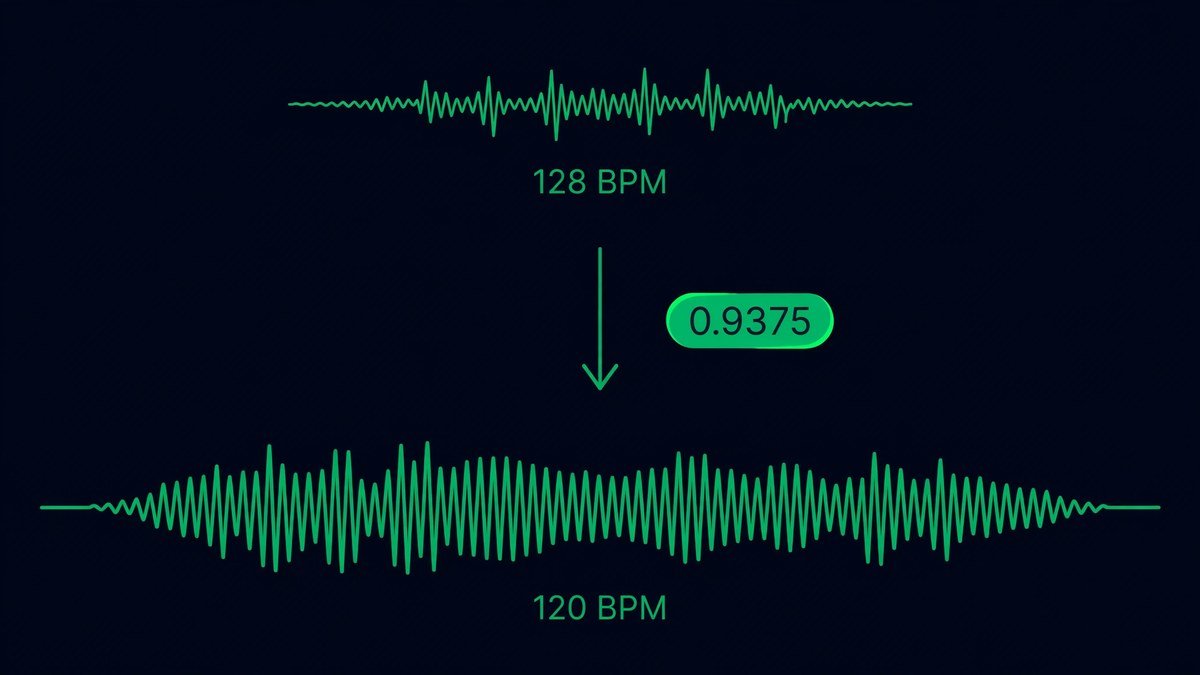
Take a house track at 128 BPM that lasts 3 minutes 42 seconds. You want it at 120 BPM to mix with a pop track. Speed factor = 120 divided by 128 = 0.9375, or 93.75 percent. New duration = 222 divided by 0.9375 = 236.8 seconds, so the track gets about 15 seconds longer. Beat length before = 60,000 divided by 128 = 468.8 ms. Beat length after = 60,000 divided by 120 = 500 ms.
Common BPM moves
| Move | Speed factor | What happens | Best use |
|---|---|---|---|
| 128 BPM to 120 BPM | 0.9375 (93.75%) | Track gets 6.7% longer | House into a pop set |
| 140 BPM to 150 BPM | 1.0714 (107.14%) | Track gets 6.7% shorter | Trap energy lift |
| 120 BPM to 90 BPM | 0.75 (75%) | Track gets 33% longer | Slow practice |
| 174 BPM to 87 BPM | 0.5 (50%) | No stretch needed, half-time | Drum and bass to hip hop feel |
| 80 BPM to 100 BPM | 1.25 (125%) | Track gets 20% shorter | Ballad to workout pace |
Doubling or halving is free: a 92 BPM part sits over a 184 BPM track with no stretching at all.
Step by step: change bpm of a song
- Find the original BPM. Tap along on the Tap BPM tool at https://tappingbpm.com/ for at least 16 beats. Detection often reports half or double the real tempo.
- Work out the speed factor: target BPM divided by original BPM.
- Pick the right tool: a DAW for a mix, a DJ app with Key Lock for a live set, or Audacity for a one-off file.
- Set the time stretch mode, not the speed mode. The control has a different name in every tool.
- Preview before you export. If the drums flam, the stretch is too far.
- Verify the result. Tap the new file on the Tap BPM tool and confirm it reads the target BPM.
In your DAW:
FL Studio: load the song as an audio clip, double-click it, and open the Time Stretching panel. Set the mode to Stretch, then set the tempo to your target.
Ableton Live: drop the clip on an audio track and make sure Warp is on. Set the warp mode to Complex for a full mix or Complex Pro for vocals, then change the master project tempo.
Logic Pro: enable Varispeed on the control bar and select Speed Only, not Varipitch or both.
REAPER: right-click the play rate toolbar and select Preserve pitch in audio items when changing master play rate, then change the master play rate to your factor.
In DJ software: Master Tempo and Key Lock:
Rekordbox, Serato and Traktor all do this live. Turn on Master Tempo, also called Key Lock, and the tempo fader changes the BPM while the track stays locked in its original key. The safe range for a live blend is small, usually within 6 percent either way. Turn Key Lock off for a slowed and reverb track or a sped-up edit, because there the pitch drop is the whole point.
Free tools:
Audacity is free and open source. Open the Effect menu, go to Pitch and Tempo, and choose Change Tempo. Type a percent change: 25 slows the track to 75 percent. Do not use Change Speed.
Premiere Pro hides the control in the clip menu. Right-click the clip, choose Speed/Duration or press Ctrl+R, type the speed, and tick Maintain Pitch.
FFmpeg does the same job from a terminal with the atempo filter. One atempo pass covers 0.5x to 2x; for a bigger change, chain two passes.
Online tools work for a single file with no install. Upload the track, enter the target BPM, leave the pitch control at 0, preview, then export.
How far you can push it:
Up to about 10 percent is effectively transparent on most material. From 10 to 20 percent it is audible to a trained ear but fine for practice and DJ prep. From 20 to 25 percent is the practical ceiling for a release: drums start to flam and sustained sounds develop a watery edge. Beyond 25 percent, use a half-time or double-time relationship instead. Work in stages when a big change is unavoidable: moving 160 BPM down to 120 BPM is cleaner as 160 to 140, a factor of 0.875, then 140 to 120, a factor of 0.857. Never stretch a file that is already stretched: each pass adds its own artifacts, so always go back to the original file.
After the stretch: re-time your delay and reverb:
This is the step almost everyone forgets. A delay set to the old tempo is now wrong. Re-calculate every tempo-synced effect with the new BPM: beat length in ms = 60,000 divided by BPM. At 128 BPM a quarter note delay is 468.8 ms; at 120 BPM it is 500 ms. See the full delay maths in our BPM to milliseconds guide at https://tappingbpm.com/guides/bpm-to-milliseconds-formula/ or the calculator at https://tappingbpm.com/bpm-to-ms-calculator/.
Common mistakes
- Using a playback speed slider instead of a time stretch control. Pitch moves with the tempo.
- Trusting the detected BPM without checking it. Half and double are the usual errors.
- Stretching the whole mix when stems would work better.
- Re-stretching an already stretched file. Go back to the original every time.
- Starting from a low quality source. Stretching a 128 kbps rip amplifies its compression artifacts.
Frequently asked questions:
Does changing the BPM change the pitch?
Not if the tool uses time stretching. A track slowed from 120 BPM to 90 BPM stays in its original key.
How do I speed up a song without the chipmunk voice?
Use pitch-locked time stretching and set the speed above 100 percent. The chipmunk effect comes from raising the playback rate.
Can I change bpm of a song to an exact BPM?
Yes. Divide the target BPM by the original BPM to get the speed factor: 120 BPM to 100 BPM is about 83 percent. Enter that percentage in the stretcher.
Can I change the BPM of a song on my phone?
Yes. Mobile apps such as BandLab let you change tempo on a phone, and most of them have a pitch lock or time stretch option.